Review status and activity
Synchronise ACC issue status to Bluebeam
The Sync status to Bluebeam feature Coming soon will send status changes on linked ACC issues back to their Bluebeam markups when enabled and the configuration is running. Changes made in Autodesk Forma on the web or in Revit’s Issues panel update the same ACC issue; Di.BlueConnector maps its status to the corresponding Bluebeam markup review status so reviewers can follow progress in the Studio Session.
The ACC issues table shows the current linked ACC issue status whether or not status sync is enabled. Auto-create issues is a separate setting that controls issue creation.
Read statistics
| Statistic | What it counts |
|---|---|
| MARKUPS TRACKED | Bluebeam markups tracked for the configured PDF. |
| ISSUES CREATED | ACC issues created for the configuration. |
| OPEN ISSUES | Linked ACC issues with Open status. |
| CLOSED ISSUES | Linked ACC issues with Closed status. |
ISSUE STATUS DISTRIBUTION shows a coloured bar and counts for ACC issue statuses such as Open, Pending and In review. Before creation, it shows No issues created yet. Tracked Bluebeam markups can outnumber created ACC issues, and Open plus Closed may not equal the total when other statuses are present.
Review ACC issues and Live Activity
The ACC issues tab on the right lists created ACC issues with their number, title and current status. Document and page context appears beneath the title. Use the count beside the tab to see the number of linked ACC issues.
Open Live Activity to see activity logs for the current configuration, including tracking and ACC issue creation activity. Use these logs to check progress and investigate an unexpected result.
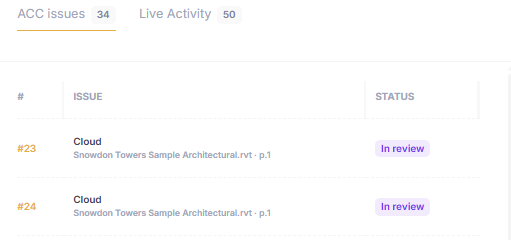
The right panel provides ACC issue status and a separate Live Activity tab.