Work with Submittals
Select Autodesk Construction Cloud > Submittals, then choose the hub and project. Each row shows a submittal’s number, title and specification section. A submittal is a workflow record; its PDFs are attachments within that record.
Transfer a PDF from a submittal
1. Open the submittal in the source panel.
2. Open References or the workflow stage containing the PDF. Stages can include Submit, Prepare to Review, Review Step and Close and Distribute.
3. Select the PDF attachment, open the destination in the other panel, and click Transfer Files.
Transfer a PDF into a submittal review
1. In the destination panel, open the submittal that should receive the PDF.
2. Select the source PDF and click Transfer Files towards the submittal.
3. In Submittals Upload, select the Response available for the current review stage. Responses shown include Approved, Approved as noted, For record only, Rejected and Revise and resubmit.
4. Enter the text under Add a response comment, check Files to upload, and click Submit.
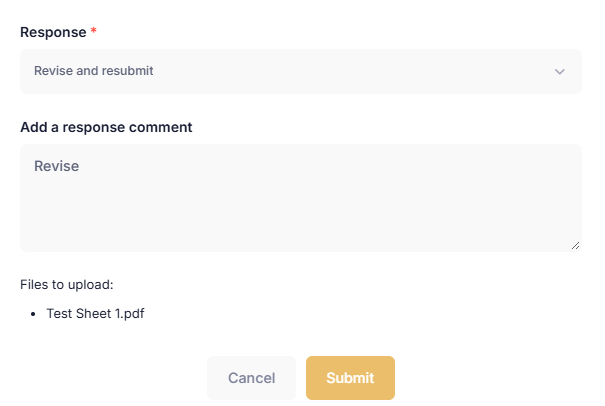
Choose a review response and add the comment accompanying the PDF.
This action submits a review response. The selected response updates the ACC submittal review stage, and the comment and PDF are attached to the relevant stage. Available responses depend on the current review stage.
The filter is not applicable to the Submittals list.
File Transfers workflow