Transfer to Bluebeam and update PDFs
In the receiving panel, select the connected Bluebeam region, choose Studio Projects or Studio Sessions, and open the required destination. Select the source PDFs in the opposite panel and click Transfer Files.
If a PDF with the same name already exists
| Destination | Choice | Result |
|---|---|---|
| Studio Project | Keep both files | Keeps the existing PDF and uploads the new file with a numeric suffix, such as (1). |
| Studio Project | Overwrite and keep markups | Replaces the PDF and carries over existing Bluebeam markups using slip sheeting. |
| Studio Project | Overwrite and remove markups | Deletes the existing PDF and uploads the new one. Existing Bluebeam markups are not kept. |
| Studio Session | Keep both files | Keeps the existing PDF and uploads the new file with a numeric suffix, such as (1). |
| Studio Session | Overwrite and remove markups | Deletes the existing PDF and uploads the new one. Existing Bluebeam markups are lost. |
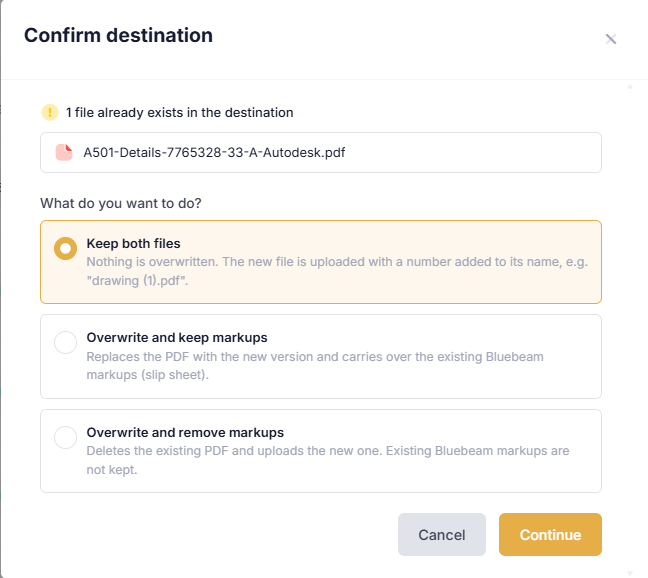
When a PDF with the same name exists in a Studio Project folder, choose to keep both files, overwrite and keep markups, or overwrite and remove markups.
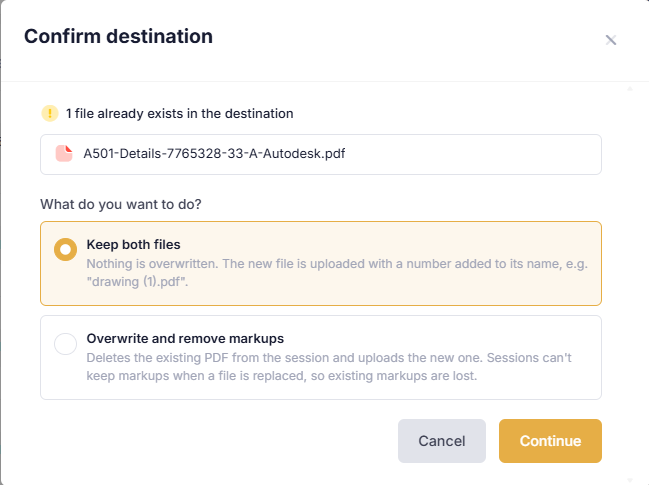
For Studio Sessions, choose whether to keep both files or overwrite and remove markups.
Update PDFs using Bluebeam slip sheeting
Slip sheeting is a Bluebeam feature. Di.BlueConnector uses it when you choose Overwrite and keep markups for a Studio Project PDF, replacing the PDF while carrying over its existing Bluebeam markups.
1. Select the updated source PDF. For an ACC Docs file, choose the version to transfer.
2. Open the Bluebeam Studio Project folder containing the existing PDF with the same name.
3. Transfer the PDF and choose Overwrite and keep markups when prompted.
4. Open the updated PDF in Bluebeam and review the retained Bluebeam markups against the revised pages.
In this transfer workflow, slip sheeting applies only to PDFs in Studio Projects. Overwriting a Studio Session PDF does not preserve Bluebeam markups.